

Manual resume organization is defined as a structured, paper-and-folder-based system that uses consistent naming conventions, printed trackers, and hierarchical file storage to manage job applications without relying on software. Hiring managers and small business owners in fields like HVAC, pool service, janitorial work, and retail often receive resumes in waves, and a disorganized pile kills hiring speed. You can organize resumes without software effectively by applying three core disciplines: a single master resume file, a deterministic naming format, and a printed or spreadsheet-based tracker. These methods give you full control, zero learning curve, and no subscription fees.
What do you need to organize resumes without software?
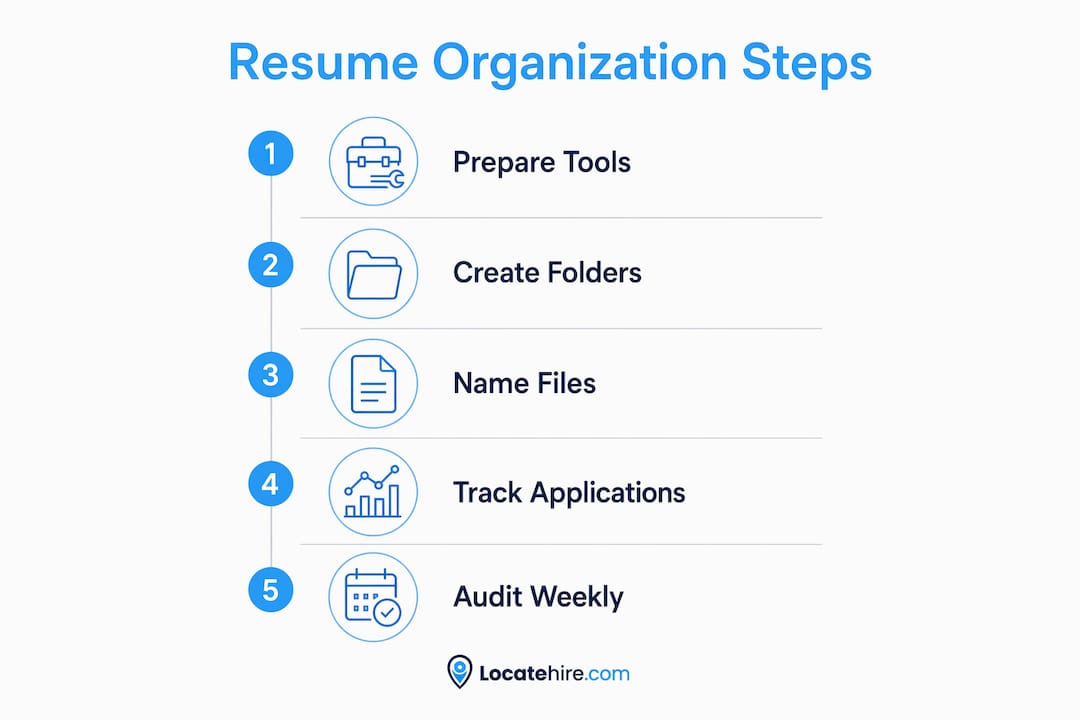
The right tools make manual resume sorting reliable from day one. You do not need anything expensive. A few physical supplies and a basic folder structure are enough to build a system that holds up under real hiring pressure.

Physical and digital supplies
For paper-based tracking, you need a printed job application tracker. Standard tracker columns include Company, Role, Date Applied, Status, CV Version Sent, and Next Action Date. That column set covers every decision point in a typical hiring cycle without adding unnecessary complexity.
A printed tracker works especially well for low-to-medium volume hiring, roughly 5–10 applications reviewed per week. Paper trackers stay visible on your desk without notifications, pop-ups, or a learning curve. For a small plumbing shop or a retail store reviewing a handful of resumes each week, that simplicity is a real advantage.
For digital storage, you need a computer with a file manager, a PDF reader, and access to a basic spreadsheet program like Google Sheets or Microsoft Excel. No specialized software is required.
Folder structure basics
Your folder system is the backbone of effective resume filing. Use a three-level hierarchy:
- Top level: One master folder labeled "Hiring" or "Resumes"
- Second level: One subfolder per open role (e.g., "Electrician_Technician_2026")
- Third level: One subfolder per candidate inside each role folder
A strict folder hierarchy named by date, company, and role prevents version mix-ups and speeds up retrieval when you need to revisit a candidate weeks later. Flat folders, where every resume sits in one location with no subfolders, are the single fastest way to lose track of who applied for what.
| Supply | Purpose |
|---|---|
| Printed tracker sheet | Log application status and next steps |
| Role-based subfolders | Separate candidates by position |
| PDF reader | Open and review resume files |
| Spreadsheet (optional) | Digital alternative to paper tracker |
| Sticky notes or flags | Mark priority candidates on printed copies |
How do you create a consistent resume naming system?
A consistent naming system is the difference between finding a resume in 10 seconds and spending 20 minutes hunting through a folder. The industry standard for this is deterministic file naming, a convention borrowed from software version control that removes all ambiguity from file identification.
The Major.Minor versioning method
Version control logic using Major.Minor naming, such as v1.0 or v1.1, reduces document management errors by 45%. Applied to resumes, v1.0 is your master file. Each tailored copy for a specific role becomes v1.1, v1.2, and so on. A major revision, say a complete rewrite of your experience section, becomes v2.0.
For hiring managers reviewing candidate files, the same logic applies to how you store and label received resumes. Rename every incoming file the moment you save it. Never keep a file named "Resume_Final_FINAL2.pdf." That name tells you nothing useful.
Naming format examples
Use this structure for every file you save:
Role_CandidateName_DateReceived.pdf(e.g.,Plumber_JohnSmith_20260315.pdf)Role_Company_DateApplied_Version.pdffor outgoing applicationsJobDescription_RoleName_DatePosted.pdffor saved job postings
Experts stress maintaining one "Source of Truth" master file that is never sent directly, plus deterministic file naming. That master file is your baseline. Every tailored version branches from it, and you never edit the master itself.
Pro Tip: Create a "00_Master" subfolder inside your Hiring folder and store only the original, unedited master resume there. Every role-specific copy lives in its own role subfolder. This one habit eliminates version confusion permanently.
Limit your total resume variants to a master file plus 2–3 role baseline versions. Keeping only a few targeted versions maintains clarity and reduces unnecessary edits. Tailoring is done by reordering bullet points, not rewriting the entire document for every single application.
What is the step-by-step workflow for manual resume management?
A repeatable workflow is what separates a functional manual system from a pile of files. Follow this sequence every time a new resume arrives.
- Receive the resume. Save it immediately to the correct role subfolder. Rename it using your naming convention before closing the file.
- Log it on your tracker. Add a row to your printed or spreadsheet tracker. Fill in Company, Role, Date Received, and Status (set to "New").
- Save the job description as a PDF. Print full job postings to PDF at the time of application and store them in the same subfolder as the candidate's resume. Web links break. A saved PDF does not.
- Initial sort by role and date. Group all resumes for the same position together. Within that group, sort by date received so the most recent applications are reviewed first.
- Review and score. Read each resume and note a quick rating (Strong, Maybe, No) directly on your tracker. Add a brief note in the Next Action column.
- Update status after each action. Every time you call a candidate, schedule an interview, or make a decision, update the tracker row immediately. Do not batch your updates.
- Archive closed roles. When a position is filled, move the entire role subfolder to an "Archive" folder. Keep it for at least one year for reference.
| Tracker column | What to record |
|---|---|
| Candidate name | Full name as listed on resume |
| Role applied for | Exact job title |
| Date received | Date file was saved |
| Status | New, Reviewing, Interview, Offer, Rejected |
| Notes | One-line summary of fit or concern |
| Next action date | Specific follow-up date |
Tracking multiple open roles simultaneously is manageable with this structure because each role has its own tracker row group and its own subfolder. You never mix candidates across positions.
What mistakes should you avoid in manual resume management?
Manual systems fail for predictable reasons. Knowing the pitfalls in advance keeps your process clean.
- Mixing master and tailored versions. Saving a tailored copy back into the master folder corrupts your baseline. Always save tailored copies to role-specific subfolders only.
- Vague file names. Files named "Resume.pdf" or "CV_updated.pdf" are useless in a folder with 20 other resumes. Rename every file on arrival.
- Overloaded tracker columns. A tracker with 15 columns becomes a burden. Stick to 6–8 columns maximum. More columns means fewer updates, which means stale data.
- Storing files on the desktop. Desktop storage is flat and unsorted. Avoid saving files on desktops or in flat folders. A hierarchical structure prevents version sprawl.
- Ignoring resume formatting issues. Resume formatting that places contact information in headers or footers, or uses graphics and tables, causes ATS parsing errors when candidates later apply through digital systems. If you plan to move to an applicant tracking system later, flag these resumes and advise candidates to reformat.
Pro Tip: Set a weekly 10-minute "tracker audit." Every Friday, scan your tracker for any row where the status has not been updated in more than five days. Stale rows are the first sign that your system is slipping.
Screening applicants efficiently depends on clean data. A tracker with outdated statuses is worse than no tracker at all because it creates false confidence. Discipline in updating beats any feature a software tool could offer.
Key Takeaways
A disciplined manual system built on consistent naming, hierarchical folders, and a simple tracker is the most reliable way to keep resumes organized without software.
| Point | Details |
|---|---|
| Use a printed or spreadsheet tracker | Log every candidate with columns for status, role, date received, and next action. |
| Apply deterministic file naming | Name every file using Role_CandidateName_Date format the moment you save it. |
| Maintain one master resume file | Store the original in a locked subfolder and branch all tailored copies from it. |
| Build a three-level folder hierarchy | Organize by Hiring folder, then role subfolder, then candidate subfolder. |
| Save job descriptions as PDFs | Print postings to PDF at application time so you never lose context when links break. |
Why manual systems deserve more credit than they get
Manual resume organization gets dismissed as outdated, but that view misses something real. The hiring managers I have seen struggle most are not the ones using paper trackers. They are the ones who adopted software they never fully learned, ended up with half their data in the tool and half in their inbox, and lost track of candidates entirely.
The truth is that system discipline matters more than tools. A well-maintained spreadsheet tracker beats a poorly used applicant tracking system every time. The folder hierarchy and naming convention described here require zero budget and zero onboarding. For a pool service company hiring seasonal workers or a janitorial firm that posts the same three roles every quarter, that simplicity is not a limitation. It is the right fit.
Where manual methods genuinely fall short is at scale. When you are reviewing more than 20 resumes per week across multiple open roles, manual tracking becomes a full-time job in itself. That is the natural inflection point where a purpose-built tool earns its place. The goal is not to stay manual forever. The goal is to build habits that make any system, manual or digital, work correctly.
— Jeff
Ready to take your hiring process further?
Manual methods work well up to a point. When your hiring volume grows or you are managing multiple roles at once, a purpose-built system saves real time. Locatehire is an applicant tracking system built specifically for small businesses in trades, retail, and service industries. It handles the tracking, sorting, and status updates that your paper system currently manages, without the complexity of enterprise software.
If you run a pool service, HVAC company, or retail operation and want to move beyond manual tracking, explore Locatehire to see how it fits your hiring workflow. No bloated features, no steep learning curve.
FAQ
What is the best way to organize resumes without software?
The best method uses a three-level folder hierarchy, a printed or spreadsheet tracker with 6–8 columns, and a deterministic file naming convention like Role_CandidateName_Date.pdf. These three elements together prevent version mix-ups and keep every candidate's status visible.
How many resume versions should I keep?
Keep one master file plus no more than 2–3 role-specific baseline versions. Limiting resume variants to a master and a few targeted copies reduces confusion and prevents unnecessary edits.
Why should I save job descriptions as PDFs?
Job postings disappear or change after a position closes. Saving the full posting as a PDF at the time of application preserves the context you need for follow-up calls and interview preparation.
How do I track resume status without an app?
Use a printed tracker or a basic spreadsheet with columns for candidate name, role, date received, status, notes, and next action date. Update every row immediately after each hiring action to keep data current.
When should I switch from manual to a digital tracking system?
Manual tracking works well for low-to-medium volume hiring, roughly 5–10 applications per week. When volume exceeds that consistently or you are managing more than three open roles at once, a dedicated applicant tracking system for small businesses becomes the more practical choice.