

Tracking multiple job openings simultaneously means maintaining a centralized, organized system where you can view, update, and manage all jobs and applicants in one place. For HR managers and small business owners in fields like HVAC, plumbing, retail, or janitorial services, juggling five or ten open roles at once without a structured system creates missed candidates, delayed hires, and real revenue loss. The good news: the right combination of tools, workflows, and automation makes multi-opening recruitment manageable. This guide covers the platforms, processes, and best practices that actually work.
What tools help you track multiple job openings at once?
The industry term for managing concurrent job requisitions is multi-requisition tracking, and it sits at the core of any applicant tracking system (ATS). The tools available range from free employer dashboards to enterprise-grade platforms, and choosing the right one depends on your volume, budget, and existing tech stack.
Indeed Employer Dashboard is the most accessible starting point for small businesses. It consolidates all your active job postings into one view, showing applicant counts, job status, and candidate pipeline stages per role. Fully completed job postings earn higher Job Scores, and Indeed reports 84% of employers receive more applications when their postings hit that threshold. That number matters because more applicants per role means your tracking system carries more weight.

Oracle HCM Manage Applications takes a two-level approach. The top level gives you an overview of all open requisitions. Drilling into any single role reveals structured tabs covering Application & Resume, Interview, Offer, and Hire. This layered navigation model is the gold standard for per-applicant detail across many concurrent openings. It is built for larger HR teams but illustrates the architecture every small business should replicate, even in simpler tools.
For small businesses that need something between a free dashboard and an enterprise system, purpose-built ATS platforms designed for small business recruitment fill that gap. These tools centralize postings, automate status updates, and connect to job boards without requiring a dedicated IT team.
| Tool | Best for | Key strength | Limitation |
|---|---|---|---|
| Indeed Employer Dashboard | Small to mid-size businesses | Free, high applicant volume | Limited workflow customization |
| Oracle HCM | Enterprise HR teams | Deep per-applicant detail | Complex setup, high cost |
| Purpose-built ATS (e.g., Locatehire) | Small businesses with ongoing hiring | Centralized tracking, automation | Varies by platform |
| Spreadsheets | Solo recruiters, very low volume | Free, flexible | No automation, error-prone |
Pro Tip: Choose platforms that integrate directly with your existing job boards. A tool that requires manual copy-paste between systems defeats the purpose of centralized tracking.
How do you design a workflow to monitor applications across many roles?
A workflow is only as good as its consistency. When you manage job applications across five or more open roles, inconsistent stage names and scattered status updates create the exact confusion you are trying to avoid. The fix is standardization before you post a single job.
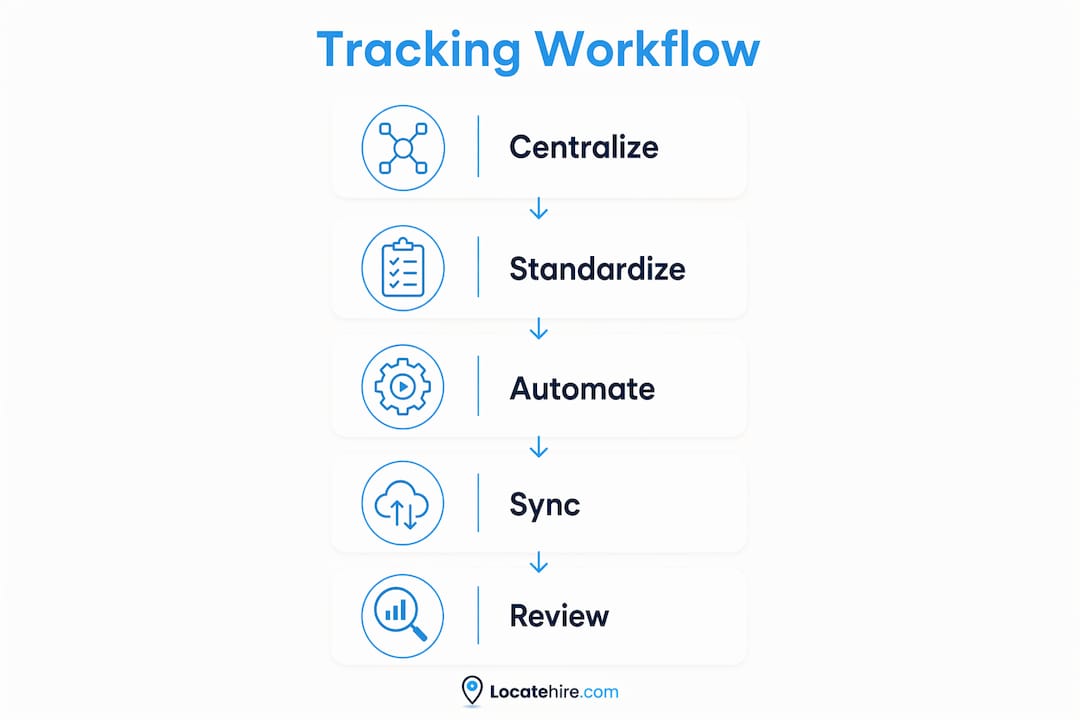
ATS workflows govern the hiring process from requisition submission through onboarding, automating screening, ranking, interview scheduling, and offers for each role distinctly. Modern systems let you configure measurable stages per role, which is the foundation of efficient multi-job tracking.
Here is a practical workflow setup for small businesses managing multiple openings:
- Define universal pipeline stages. Use the same stage names across every role: Screening, Phone Interview, In-Person Interview, Offer, and Hired. Consistent labels let you switch between requisitions without reorienting yourself each time.
- Create role-specific sub-stages only when necessary. A plumbing technician role may need a license verification step that a retail cashier role does not. Add sub-stages within the universal framework rather than building entirely separate pipelines.
- Set automated reminders for follow-up. If a candidate sits in the Phone Interview stage for more than three days with no action, your system should flag it. Stalled candidates are the most common source of dropped hires.
- Use bulk actions for status updates. When ten candidates apply to the same role in one day, moving them all from "Applied" to "Screening" individually wastes time. Bulk actions cut that task to seconds.
- Maintain a two-level dashboard view. Your overview shows all open roles and their candidate counts. Clicking into any role reveals the detailed candidate pipeline for that specific opening. Never work only at the detail level or you lose sight of the full picture.
Pro Tip: Unify tab labels across all openings before you start recruiting. Switching between a role labeled "Interview Scheduled" and another labeled "Phone Screen Complete" costs more mental energy than it seems, especially when you are managing eight roles at once.
How do you automate updates and keep multiple job postings in sync?
Automation is where multi-requisition tracking moves from manageable to genuinely efficient. The biggest risk in multi-channel posting is stale data: a role that filled yesterday still showing as active on three job boards, or a salary update that never pushed to Indeed.
Indeed's Job Sync API has a clear rule: send job changes immediately, and updates not sent within 15 minutes can cause lowered job visibility. That is not a soft recommendation. Delayed updates directly reduce how often your posting appears in candidate searches. For a small business competing for HVAC technicians or experienced retail managers, that visibility drop translates to fewer qualified applicants.
Key automation practices to implement:
- Batch updates below 100 jobs per submission. Indeed's Job Sync API requires batch sizes under 100 to maintain synchronization. Most small businesses never hit that ceiling, but if you use a third-party ATS that aggregates postings for multiple clients, this limit matters.
- Schedule near-real-time sync. Do not rely on nightly batch jobs for job posting updates. A role that closes at 2 PM should stop accepting applications by 2:05 PM, not the next morning.
- Automate candidate status notifications. Every time a candidate moves through a stage, an automated email should go out. This removes the manual communication burden from your hiring managers and keeps candidates engaged.
- Connect all posting channels to one source. Your ATS should be the master record. Changes made in the ATS push outward to Indeed, Google Jobs, and any other boards. Never update a job board directly and then try to sync back to your ATS.
Pro Tip: Implement near-real-time automated sync from day one. Retrofitting automation into a manual process after you have 12 open roles is significantly harder than building it in at the start.
What are the common challenges when tracking multiple job openings?
The most common failure mode is not a bad tool. It is using too many tools at once. Teams that track job opportunities across spreadsheets, email threads, and a job board dashboard simultaneously create three versions of the truth, and none of them are reliable.
- Scattered data sources. When one hiring manager tracks candidates in a Google Sheet and another uses email labels, you have no single view of your recruiting health. The fix is enforcing one platform as the single source of truth for all requisition status. Spreadsheets and analytics tools are fine for supplementary reporting, not core tracking.
- Manual tracking errors. A candidate who interviewed for your electrician role and your HVAC role should appear in both pipelines without duplication confusion. Manual systems almost always fail this test. An ATS with candidate relationship management handles cross-role applicants cleanly.
- Communication bottlenecks. Hiring managers who are not inside the ATS create delays. If a field supervisor needs to approve a candidate but only communicates by text, that approval lives outside your system. Pull every decision-maker into the platform, even if they only log in to approve or reject.
- Context switching fatigue. Jumping between eight open roles without a consolidated dashboard is mentally exhausting and error-prone. Recruiters lose track of where they left off, miss follow-ups, and duplicate outreach. A unified view eliminates this.
- No analytics to detect bottlenecks. If your offer acceptance rate for one role is 40% and another is 90%, something is wrong with the first role's process or compensation. Without reporting built into your tracking system, you will not catch that pattern until it costs you several hires.
The applicant screening process also breaks down fast when it is not standardized across roles. Consistent screening criteria per role type, applied through your ATS, keeps quality high even when volume spikes.
Key takeaways
Efficient multi-requisition tracking requires one centralized platform, standardized workflows, and automated synchronization to prevent visibility loss and recruiter errors.
| Point | Details |
|---|---|
| Centralize all requisitions | Use one ATS dashboard as the single source of truth for every open role. |
| Standardize pipeline stages | Apply the same stage names across all openings to reduce context switching. |
| Automate job board sync | Push updates within 15 minutes to maintain posting visibility on job boards. |
| Enforce a two-level view | Use an overview dashboard plus per-role drill-down to manage scale without losing detail. |
| Eliminate scattered tools | Remove spreadsheets and email threads from core tracking to prevent data conflicts. |
Why simplicity beats sophistication in multi-job recruiting
I have seen small businesses in trades and retail spend weeks evaluating enterprise ATS platforms with AI scoring, predictive analytics, and automated video interviews. Then they go live, get overwhelmed by the configuration, and end up tracking candidates in a shared spreadsheet anyway. The tool did not fail them. The complexity did.
My honest view: the most effective system for tracking multiple job openings is the simplest one your whole team will actually use. A pool service company hiring five technicians a month does not need Oracle HCM. It needs a clean dashboard, consistent stage names, and automated notifications. That is it.
What I have found actually works is choosing a platform that matches your hiring rhythm, not your aspirations. If you hire in bursts, you need bulk actions and fast posting sync. If you hire continuously, you need a pipeline that never goes stale and reminders that fire automatically. The hiring process structure matters more than the tool's feature count.
One more thing: communication between hiring managers is the variable most articles ignore. The best ATS in the world cannot fix a situation where your field supervisor approves candidates by text and your office manager tracks them in email. Get everyone into one system, even minimally, before you worry about automation.
— Jeff
How Locatehire makes multi-opening recruitment manageable
Locatehire is built specifically for small businesses with ongoing hiring needs, from HVAC and plumbing companies to retail and janitorial services. If you are ready to stop juggling spreadsheets and start managing every open role from one place, Locatehire gives you a centralized dashboard, automated candidate workflows, and real-time job board sync out of the box.
Every feature in Locatehire is designed around the reality of small business recruiting: fast turnover, multiple concurrent openings, and hiring managers who are not full-time HR professionals. From posting to onboarding, the platform handles the tracking so you can focus on choosing the right people. Explore AI-powered recruitment with Locatehire and see how much time you get back when your system does the work.
FAQ
What does it mean to track multiple job openings simultaneously?
It means managing all active job requisitions, candidate statuses, and hiring stages in one centralized system rather than across separate tools or spreadsheets. The goal is a single, consistent view of every open role and every applicant.
What is the best tool for managing multiple job openings?
For small businesses, a purpose-built ATS like Locatehire or the Indeed Employer Dashboard provides the right balance of simplicity and functionality. Enterprise teams often use Oracle HCM for deeper per-applicant tracking across many concurrent roles.
How often should job postings be updated when hiring for multiple roles?
Job changes should be sent within 15 minutes to avoid drops in job board visibility. Near-real-time automated sync is the standard for any business posting to multiple channels at once.
Why do spreadsheets fail for multi-job tracking?
Spreadsheets have no automation, no notifications, and no integration with job boards. When multiple people edit the same file, data conflicts and version errors are inevitable. An ATS eliminates these problems by making one platform the authoritative record for all hiring activity.
How do you avoid losing track of candidates across multiple open roles?
Use a candidate relationship management feature within your ATS to track applicants who have applied to more than one role. Standardized pipeline stages and automated follow-up reminders prevent candidates from falling through the cracks when your attention is split across many openings.