

An applicant tracking system (ATS) is specialized software that centralizes every step of the recruiting process, from posting jobs to making hiring decisions, inside a single platform. For HR professionals and hiring managers at small businesses, understanding what is an applicant tracking system means recognizing it as the operational core of modern recruiting. An ATS replaces scattered spreadsheets, email threads, and paper applications with one organized system. Tools like Locatehire are built specifically for small businesses with ongoing hiring needs, including pool service companies, HVAC contractors, janitorial services, and retail operations.
What is an applicant tracking system and what does it do?
An applicant tracking system is defined as software that centralizes the entire hiring workflow into one digital platform, covering job postings, resume collection, candidate screening, interview scheduling, and final hiring decisions. That definition matters because it separates ATS software from simpler tools like job board accounts or shared inboxes, which only handle one piece of the puzzle.
The core function of an ATS is to give you one place to manage every applicant, at every stage, across every open position. When a candidate applies through your job posting, the ATS captures their information automatically. It then organizes that data so you can search, filter, and move candidates through your hiring stages without switching between tools.

Modern ATS platforms also integrate with job boards, background check services, and e-signature tools. That means you can post a single job listing and have it appear on Indeed, ZipRecruiter, and Google Jobs simultaneously. For a small business owner managing hiring alongside daily operations, that kind of reach without extra manual work is the real value.
How does an ATS work? parsing, searching, and filtering
The technical process behind an ATS starts with resume parsing. When a candidate submits a resume, the ATS parsing engine reads the document and extracts structured data, pulling out fields like job titles, skills, dates of employment, and education. That structured data gets stored in a searchable database.
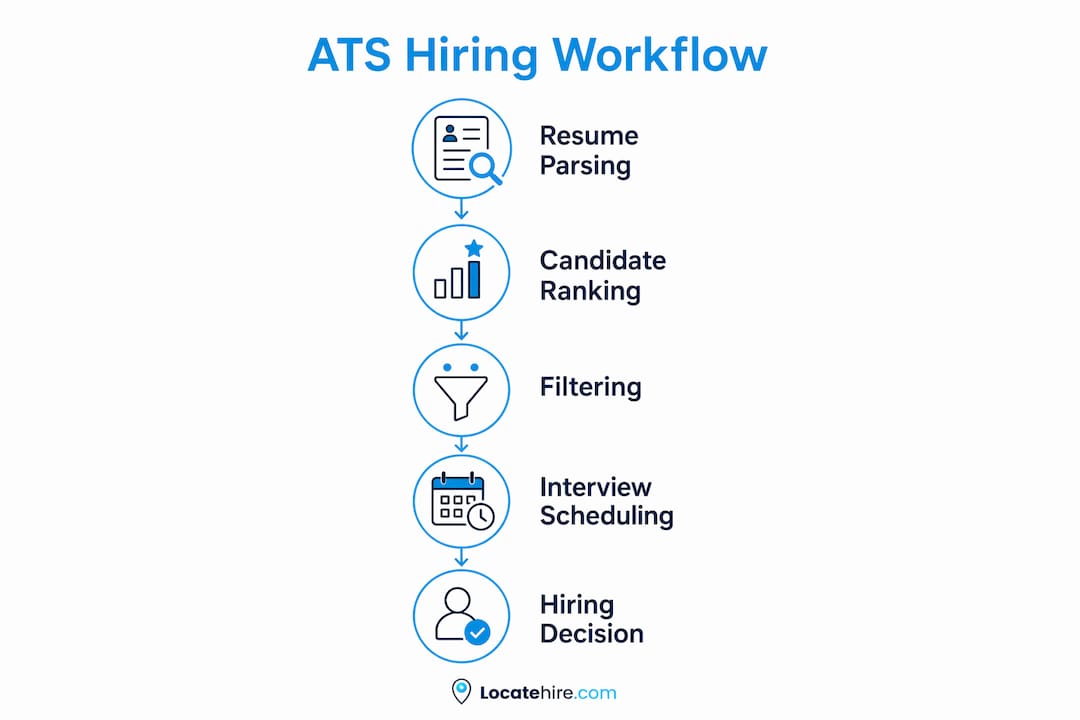
Modern ATS software uses Natural Language Processing and inverted indexes to let recruiters search thousands of applications in seconds. Think of an inverted index like the index in the back of a textbook. Instead of reading every page to find a topic, you go straight to the page number. An ATS does the same with resumes, pointing you instantly to candidates who match your search terms.
Recruiters use Boolean logic to run those searches. A query like "HVAC AND (certified OR licensed) NOT apprentice" returns only the candidates who match your specific criteria. That kind of precision is impossible with a spreadsheet.
Here is how the filtering process typically works:
- Job posting: You create a listing and the ATS distributes it to multiple job boards at once.
- Application capture: Candidates apply and the ATS stores their resumes and answers in structured fields.
- Knockout questions: Applicants answer screening questions (Do you have a valid driver's license?) and the ATS flags or separates responses based on your rules.
- Search and filter: You run keyword or Boolean searches to surface the strongest candidates.
- Stage management: You move candidates through stages like "Phone Screen," "Interview Scheduled," and "Offer Extended."
Pro Tip: Write job descriptions using the exact titles and skills your ideal candidate would put on their resume. ATS matching works on keyword overlap, so the closer your job post language matches real candidate language, the better your search results will be.
What are the key benefits of an ATS for small businesses?
The biggest benefit of an ATS for a small business is time. Automation handles repetitive tasks like posting jobs to multiple boards, sending status updates to candidates, and scheduling interviews, which frees your team to focus on actual hiring decisions. For a business where the owner or office manager is also the HR department, that time savings is significant.
Beyond speed, here is what small businesses gain from using an ATS:
- Centralized communication: Every email, note, and status update lives in one place. Your whole team sees the same candidate history, which eliminates the "I thought you followed up with them" problem.
- Compliance and recordkeeping: An ATS creates digital audit trails of every candidate interaction and hiring decision. If you ever face a hiring discrimination audit, that documentation is your legal protection.
- Scalability: When your pool service company goes from hiring two technicians a year to twenty, an ATS scales with you without adding administrative headcount.
- Integration with HR tools: Most ATS platforms connect with payroll software, onboarding tools, and background check services, so new hires move from offer letter to first day without manual data re-entry.
The compliance benefit deserves extra attention. Audit trails of candidate communication and hiring decisions give small businesses the same legal documentation that large corporations have maintained for years. That protection is no longer optional in a regulated hiring environment.
For a deeper look at how these tools fit into the broader hiring picture, the hiring software guide for small businesses covers the full category in detail.
Does an ATS automatically reject candidates?
The most common misconception about ATS software is that it autonomously rejects resumes. ATS systems do not automatically reject candidates. They provide a searchable database with filters that you configure. The actual decision to move a candidate forward or pass on them comes from a human or from rules you set up yourself.
Here is what that looks like in practice. If you set a knockout question that requires a valid commercial driver's license, the ATS will flag applicants who answer "No." But the system does not delete those applicants. They remain in your database. You decide what to do with them.
The confusion around ATS AI features follows the same pattern. Hiring managers often misunderstand ATS AI as independent decision-makers, but AI features in most ATS platforms assist recruiters with ranking algorithms and filter controls that follow your business rules. The AI surfaces candidates. You choose.
One real limitation worth knowing: resumes with complex formatting like graphics, tables, or unusual fonts can fail to parse correctly. When that happens, a qualified candidate becomes invisible in your searches because their skills and titles never made it into the structured database. This is a parsing engine limitation, not an AI decision.
Pro Tip: When reviewing your ATS results, periodically check the unfiltered applicant list, not just the top-ranked candidates. Parsing errors can bury strong applicants who used a creative resume format. A quick manual scan catches what the parsing engine missed.
How to choose and implement an ATS for your small business
Selecting the right ATS starts with four criteria that matter most to small businesses: ease of use, cost, integrations, and customer support. Small businesses have different needs than enterprises, and the right ATS reflects that by offering a simple interface and pricing that fits a smaller budget.
Follow these steps to get an ATS working for your team:
- Define your hiring volume. How many positions do you fill per month? A janitorial company hiring ten cleaners a month needs different capacity than a plumbing company hiring two technicians a year.
- List your must-have integrations. Identify which job boards, payroll systems, or background check tools you already use. Confirm the ATS connects to them before you commit.
- Run a trial with a real job posting. Most ATS platforms offer a free trial. Use it on an active position so you see how the workflow actually feels, not just how it looks in a demo.
- Train your team before going live. Even a simple ATS requires a short onboarding session. Set up your stages, knockout questions, and email templates before the first application arrives.
- Review and adjust after 30 days. Check which filters are working, which candidates are slipping through gaps, and whether your job descriptions are generating the right keyword matches.
Here is a quick comparison of what to look for across ATS options for small businesses:
| Feature | Why It Matters for Small Business |
|---|---|
| Multi-board job posting | Saves time distributing listings manually |
| Resume parsing accuracy | Determines which candidates appear in searches |
| Knockout question setup | Filters unqualified applicants before manual review |
| Compliance recordkeeping | Protects against hiring discrimination claims |
| Mobile access | Lets owners and managers review candidates anywhere |
| Pricing per user or per job | Controls costs when hiring volume fluctuates |
For businesses comparing options, the applicant screening guide for small businesses explains how AI-powered filtering works across different platforms.
Key takeaways
An ATS is the most direct way for small businesses to reduce hiring time, stay compliant, and make better decisions with the same staff they already have.
| Point | Details |
|---|---|
| ATS definition | An ATS centralizes job posting, resume collection, screening, and hiring decisions in one platform. |
| How parsing works | The ATS extracts structured data from resumes so recruiters can search thousands of applications instantly. |
| ATS does not reject automatically | Filtering rules and knockout questions are set by humans; the ATS surfaces candidates, not decisions. |
| Compliance value | Digital audit trails of every candidate interaction provide legal protection for small businesses. |
| Selection criteria | Prioritize ease of use, cost, integrations, and support when choosing an ATS for a small business. |
What i've learned after watching small businesses adopt ATS software
Most small business owners I talk to come in with one of two assumptions. Either they think an ATS is too complicated for a ten-person company, or they assume the software will do the hiring for them. Both assumptions cost them time.
The businesses that get the most out of an ATS are the ones that treat it as a decision-support tool, not a replacement for judgment. A pool service company that sets up clear knockout questions, writes job descriptions with real trade language, and reviews candidates weekly will outperform a larger competitor that dumps resumes into a system and waits for the AI to sort it out.
The compliance angle is also underestimated. I have seen small businesses in retail and HVAC face hiring complaints with no documentation to defend themselves. An ATS solves that problem before it starts. Every note, every status change, every email is logged automatically.
My honest advice: start simple. Pick an ATS built for your size of business, run one job posting through it, and measure the time you save. You do not need every feature on day one. You need the core workflow to work. Once it does, the rest follows naturally. The businesses that struggle are the ones that over-configure before they understand the basics.
— Jeff
Built for small businesses that hire constantly
If you run a business where hiring never really stops, whether that is a janitorial company replacing seasonal staff or an electrical contractor always looking for licensed technicians, Locatehire is built for exactly that situation.
Locatehire handles multi-board job posting, resume parsing, candidate filtering, and compliance recordkeeping in one platform designed for small business workflows. There is no enterprise complexity and no pricing built for a 500-person HR department. You get the AI-powered recruiting tools that make hiring faster without requiring a dedicated recruiter to manage them. If you are ready to replace the spreadsheet and the inbox, Locatehire is the place to start.
FAQ
What is the applicant tracking system definition?
An applicant tracking system is software that manages the full recruiting process, from job posting to hiring decisions, inside a single platform. It automates repetitive tasks and organizes candidate data so hiring teams can work faster and more consistently.
How does an ATS work with resumes?
An ATS parses resumes by extracting structured data like job titles, skills, and dates into a searchable database. Recruiters then use keyword searches or Boolean queries to find candidates who match their requirements.
Does an ATS automatically reject resumes?
No. An ATS does not automatically reject candidates. It filters and ranks applicants based on rules you configure, but the final decision to advance or pass on a candidate is made by a recruiter or hiring manager.
Why use an ATS in a small business?
An ATS saves time by automating job posting, candidate communication, and interview scheduling. It also creates compliance records that protect small businesses during hiring audits or discrimination reviews.
What should small businesses look for in applicant tracking software?
Small businesses should prioritize ease of use, affordable pricing, job board integrations, and built-in compliance recordkeeping. Platforms built specifically for small business hiring volume will fit better than enterprise tools scaled down.