

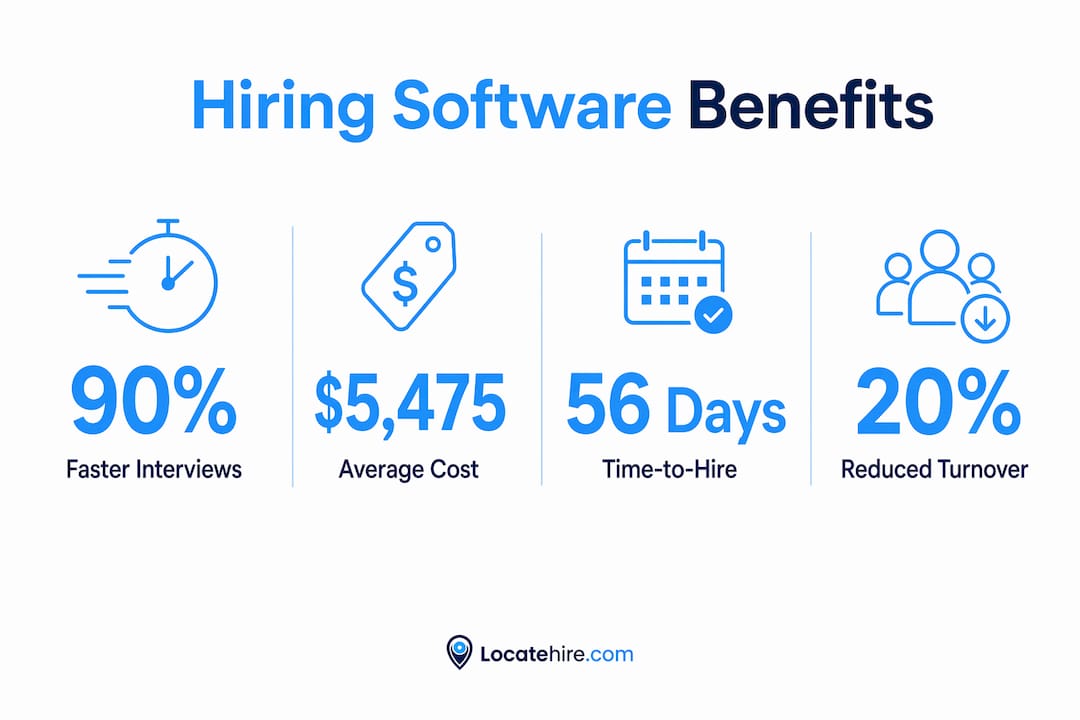
Hiring software for small businesses is a set of tools that automate recruiting tasks including candidate sourcing, screening, scheduling, and onboarding to cut time-to-fill and reduce cost per hire. The role of hiring software in small business recruitment has expanded sharply in 2026, with AI-driven platforms like Eightfold AI Interviewer and applicant tracking systems like Locatehire giving owners in trades, retail, and service industries real operational leverage. The average time to fill a nonexecutive role sits at approximately 56 days with a cost per hire around $5,475. That number represents weeks of owner time that most small businesses simply cannot afford to lose. This guide covers how these systems work, what features matter, and what compliance obligations apply in 2026.
How does hiring software reduce recruitment time and costs for small businesses?
Hiring software cuts time-to-fill by targeting the stages where delays accumulate most: screening, interview scheduling, and candidate communication. Hiring software that only accelerates job posting without improving downstream stages does not materially shorten hiring time or reduce costs. The real gains come from automating the handoffs between stages.
Consider a pool service company hiring three technicians. Without software, the owner manually reviews 80 applications, emails candidates one at a time, and waits days for replies before scheduling interviews. With an AI-powered applicant tracking system, resume parsing ranks candidates automatically, and interview slots are offered and confirmed without a single back-and-forth email.

AI hiring tools can reduce time to first interview by up to 90%, with deployment taking hours rather than weeks. That is not a marginal improvement. For a plumbing company trying to fill a service tech role before the busy season, cutting three weeks off the process is the difference between winning and losing jobs.
The table below shows where time and cost savings concentrate across the hiring cycle:
| Hiring stage | Manual time cost | Software impact |
|---|---|---|
| Application screening | 3-5 hours per 50 applicants | Automated ranking cuts to under 30 minutes |
| Interview scheduling | 2-4 hours of back-and-forth | Self-scheduling links eliminate delays entirely |
| Candidate communication | Daily manual follow-ups | Automated reminders and status updates |
| Onboarding paperwork | 4-6 hours per new hire | Digital workflows reduce to under 1 hour |
Pro Tip: Map your current hiring workflow on paper before selecting software. Identify the two stages where you lose the most time. Then confirm the platform you choose specifically automates those stages, not just job posting.
What features and AI capabilities matter most for small businesses?
The best hiring software for small businesses combines automation with enough flexibility to handle variable hiring volumes, which is exactly the situation facing HVAC companies, janitorial services, and retail operators who hire in bursts. Here are the core features that deliver measurable value:
- Automated job ad drafting. AI generates role descriptions from a job title and a few inputs, saving 30 to 60 minutes per posting. This matters when you are filling the same role repeatedly across locations.
- Resume parsing and candidate ranking. The system scores applicants against defined criteria so you review a shortlist, not a pile. AI can automate candidate interaction and assessment but must apply transparent and equitable criteria to avoid bias.
- AI conversational interviews and chatbots. Candidates answer structured questions via text or video at their own schedule. This is particularly useful for hourly roles where candidates may not be available for a phone screen during business hours.
- Automated scheduling and reminders. Communication delays are the biggest time sink in hiring cycles. Software that sends calendar invites, confirmations, and reminders removes this bottleneck without owner involvement.
- Onboarding workflow automation. Digital onboarding checklists, document collection, and training assignments reduce the administrative load after an offer is accepted.
The onboarding piece deserves special attention. 20% of new hires leave within 45 days, and each turnover costs between $15,000 and $50,000. Automated onboarding that keeps new employees engaged and informed from day one directly reduces that risk.
Pro Tip: Ask any vendor to show you the candidate-facing experience, not just the employer dashboard. If the application and scheduling flow feels clunky on a phone, you will lose qualified candidates before they finish applying.
What compliance risks should small businesses know about in 2026?
Compliance is not optional when using AI-powered recruitment tools, and the rules tightened significantly this year. Ontario employers with 25 or more employees must disclose AI use in screening or selection in every public job posting, effective January 1, 2026. This means the software settings you choose become part of your job-posting compliance documentation.
The four compliance obligations every small business owner should understand:
- Disclose AI use in job postings. If your applicant tracking system uses AI to screen or rank candidates, that fact must appear in the job ad. Generic language is not sufficient. The disclosure must reflect how AI is actually used.
- Retain human oversight at every decision point. Employers cannot shift liability to software providers for discrimination claims. If an AI tool screens out a protected class of candidates due to biased training data, the employer is responsible.
- Audit your tools regularly. Ongoing governance checks are required because vendors update AI features continuously. A tool that was compliant in March may have new embedded AI stages by September.
- Document your process. Keep records of how candidates were screened, what criteria the AI applied, and who made the final decision. This documentation is your defense in any discrimination complaint.
"Employers cannot outsource liability by using AI-powered hiring software. Human judgment and governance remain essential safeguards." — SpringLaw
The bias risk is real and specific. AI screening tools trained on historical hiring data can perpetuate patterns from past decisions, including patterns that favored certain demographics. A janitorial company that historically hired from one zip code may find its AI tool deprioritizing candidates from other areas. Human review of the shortlist is not a formality. It is a legal and ethical requirement.
How can small businesses integrate hiring software effectively?
Integration success depends on matching the software to your actual workflow, not adopting a platform built for enterprise HR teams. Here is how to approach it:
- Evaluate fit for your hiring volume and role types. A retail store filling seasonal cashier roles needs different automation than an electrical contractor hiring licensed journeymen. Confirm the platform handles your specific job categories and application volumes.
- Check integration with tools you already use. The software should connect with your email, calendar, and any existing communication tools. Disconnected systems create the same delays you are trying to eliminate.
- Prioritize fast deployment. The best platforms deploy in hours. If a vendor quotes a multi-week implementation, that is a signal the system was not built for small business scale.
- Train your staff on the candidate communication flow. The biggest integration failure is when candidates fall into a queue and receive no updates. Automated touchpoints must be configured before you go live.
- Map your recruitment workflow first. Identify every step from job posting to first day, then confirm which steps the software automates. Reducing manual admin across screening, scheduling, and offer processes shortens overall time-to-fill beyond what any single feature can achieve alone.
The comparison below shows the difference between a software-supported process and a manual one for a typical small business hire:
| Process step | Manual approach | Software-supported approach |
|---|---|---|
| Job posting | Written from scratch, posted to one board | AI-drafted, distributed to multiple boards automatically |
| Screening | Owner reviews all applications | AI ranks top candidates, owner reviews shortlist |
| Interview scheduling | Email chains over 3-5 days | Candidate self-schedules in under 10 minutes |
| Offer and onboarding | Paper forms, manual follow-up | Digital documents, automated task checklists |
For a deeper look at building a structured hiring process from the ground up, Locatehire's resource library covers each stage in detail.
What benefits beyond speed can small businesses expect?
Speed is the headline benefit, but the impact of hiring technology on small businesses goes further. Structured, software-supported interviews evaluate candidates on skills and responses rather than first impressions or familiarity. This produces better hires, not just faster ones.
Candidate experience also improves significantly. When applicants receive immediate confirmation, clear next steps, and timely updates, they stay engaged through the process. Why candidate experience matters is especially relevant for trades and service businesses competing for the same pool of qualified workers as larger employers. A fast, professional application process signals that your company is organized and worth joining.
The competitive advantage in tight labor markets is concrete. A plumbing company that moves a candidate from application to offer in five days beats a competitor that takes three weeks. The best candidates accept the first reasonable offer they receive. Slow hiring is not just inefficient. It is a direct cause of losing qualified people to competitors.
Finally, reduced administrative fatigue matters for owners and managers who handle hiring alongside their primary responsibilities. When screening, scheduling, and follow-up run automatically, the mental load of hiring drops enough that owners can focus on evaluating the final shortlist rather than managing logistics.
Key takeaways
Hiring software delivers its full value only when it automates the entire recruitment workflow from screening through onboarding, not just the job posting stage.
| Point | Details |
|---|---|
| Time and cost savings are real | Average cost per hire is $5,475 and 56 days; software targets both by automating screening and scheduling. |
| AI features require transparency | Disclose AI use in job postings and maintain human oversight at every decision point to stay compliant. |
| Onboarding automation reduces turnover | 20% of new hires leave within 45 days; automated onboarding directly lowers this costly risk. |
| Integration fit matters more than features | Match the platform to your hiring volume and role types before evaluating individual capabilities. |
| Speed creates competitive advantage | Moving candidates from application to offer faster than competitors wins qualified workers in tight labor markets. |
What I've learned watching small businesses adopt hiring software
I have seen small business owners approach hiring software in two ways. The first group treats it as a magic fix and turns on every AI feature without reviewing what the system is actually doing. The second group maps their workflow, configures the tool deliberately, and checks the output regularly. The second group gets results. The first group gets frustrated and blames the software.
The compliance piece is where I see the most dangerous complacency. Owners assume that because a vendor sells a compliant product, they are covered. That is not how liability works. Employers remain responsible for every hiring decision the software influences. Reading the disclosure requirements and actually updating your job postings is not optional. It is the minimum.
What genuinely surprised me is how much candidate engagement improves when communication is automated. Candidates who receive a confirmation within minutes of applying and a scheduling link within hours respond at dramatically higher rates than those who wait days for a human to follow up. The software does not replace the human relationship. It clears the path so the human relationship can start sooner.
My honest advice: start with the two most painful stages in your current process, automate those first, and measure the result before adding more features. Hiring software is an operational tool. It works when you work it deliberately.
— Jeff
See how Locatehire handles hiring for small businesses
Locatehire is an applicant tracking system built specifically for small businesses with ongoing hiring needs, including pool service, HVAC, electrical, plumbing, janitorial, and retail. The platform automates candidate screening, interview scheduling, and onboarding workflows so owners spend time on decisions, not logistics. Setup takes hours, not weeks, and the system includes AI disclosure support to keep your job postings compliant with 2026 requirements. If you are ready to cut your time-to-fill and stop losing candidates to slower competitors, explore Locatehire's AI-powered recruitment platform and see how it fits your hiring workflow.
FAQ
What is the role of hiring software for small businesses?
Hiring software automates the recruiting tasks that consume the most owner time, including application screening, interview scheduling, and candidate communication. The result is a shorter time-to-fill and a lower cost per hire without adding HR staff.
How does hiring software improve efficiency in small business recruiting?
Software removes manual bottlenecks at each stage of the hiring cycle. Automated scheduling alone eliminates days of back-and-forth, and AI-powered screening cuts application review time from hours to minutes.
What features should small businesses look for in hiring software?
The most important features are resume parsing and candidate ranking, automated interview scheduling, candidate-facing communication tools, and onboarding workflow automation. Platforms that cover all four stages deliver materially better results than those that only accelerate job posting.
Do small businesses need to disclose AI use in job postings?
Ontario employers with 25 or more employees are required to disclose AI use in screening or selection in every public job posting as of January 1, 2026. Employers in other jurisdictions should review applicable local regulations and consult legal counsel.
Can hiring software reduce employee turnover?
Automated onboarding supported by hiring software reduces early turnover by keeping new hires informed and engaged from day one. With 20% of new hires leaving within 45 days, onboarding automation is one of the highest-return features available to small businesses.